The electronic control document is prepared in the office, but it is the driver who shows it. A perfect document is of little use if the driver cannot find it on their phone, shows an old version or corrects a detail with a pen. The good news is that what they need to be able to do fits into one short session. Here is what to teach, how to teach it to each type of driver and what to watch for during the first few weeks.
Why the driver is the key piece
Article 33.3 of the Ley de Ordenación de los Transportes Terrestres (Spanish Land Transport Act) says that, in roadside inspections, the driver is considered the company's representative as regards the documentation that must be carried on board and the information about the service. What they say and show at a check is what counts.
In addition, the Resolución de 5 de junio de 2026 (Resolution of 5 June 2026) puts three moments in their hands: receiving the copy before starting the service, presenting it with the QR code when asked, and carrying the valid version if there is a correction en route. None of the three depends on the office any more.
What they need to be able to do
The driver does not need to know the order or what a contractual shipper is. It is enough that they can do six things:
- Receive it and save it. Open the link or the PDF they are sent and leave it downloaded on the phone, not just the message.
- Check their own details. Look at their plate number, the trailer's and the date before setting off.
- Show it. Open the PDF or show the QR code when asked, without searching through messages.
- Not touch it. Know that handwritten notes on the printed copy are not taken into account.
- Request a correction. Know who to call if the destination or the trailer changes, and wait to receive the new version.
- Tell the right version apart. If they have two documents for the same trip, know which one is current.
What they need to have ready for a check with no coverage is in the guide no coverage at a check. Here we focus on how to teach it.
A short session, using everyone's own phone
Slide-based explanations get forgotten. A short session in which each driver goes through the steps on their own phone works much better. For example, with a group of eight or ten drivers in the yard or the break room:
| Exercise | What it checks |
|---|---|
| You send them a test document through the same channel you will actually use | That it reaches them and they know how to open it |
| They download it, then switch on flight mode and open it again | That it is saved and does not depend on a connection |
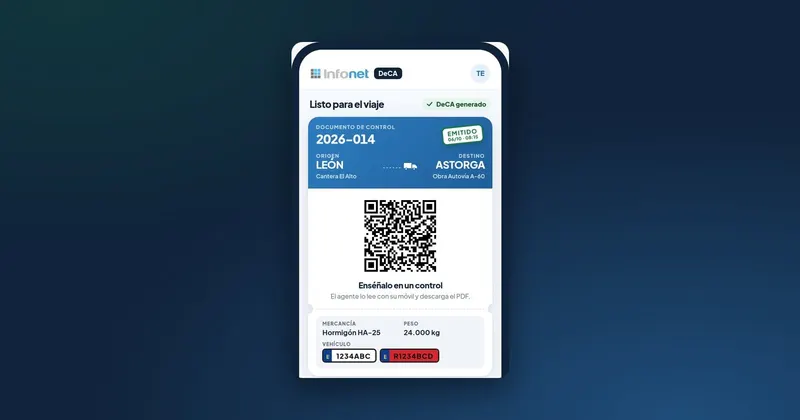
| You ask them to show you the QR code as if you were an officer | That they find it quickly without searching through messages |
| You ask them what the trailer's plate number is on the document | That they can read it and check their details |
| You send them a second, "corrected" version | That they can tell which one is valid |
| You give them a printed copy with a wrong detail | That they do not cross it out and call the office |
Use test documents with fictitious data, so that it is clearly not a real trip. Finish by leaving them the phone number to call in writing, in case something does not add up.
Employees, self-employed drivers and one-off drivers
Not all the drivers who load at your company can be trained in the same way.
Employed drivers
These are the easiest: the practical session, a sheet with the steps in the cab and a refresher after a few weeks. If they are also going to generate the document themselves, they need something extra (we cover that below).
Self-employed drivers and regular hauliers
They are not your staff, but their mistakes affect you if you are the contractual shipper. Do not ask them to attend a session: the first time, send them a short message with the essentials (how it will reach them, to save it before leaving, to check the plate number and who to call). And go over it with them in person on the first few loads.
Drivers who come once
For the lorry that loads only once, the safest option is the printed ticket with the QR code and two sentences at the weighbridge: "This is the control document; if you are asked for it, show this code." If the driver does not read Spanish well, the paper with the QR code is easier to explain with a gesture than a link in a language they do not speak well.
If the driver also generates the document
In some companies the driver creates the trip document from their phone, for example when loading somewhere with nobody from the office present. In that case the training has three extra points:
- When: always before setting off. The date and time of creation are recorded in the PDF.
- Which details are theirs: the tractor unit's plate number, the trailer's and the date, which are the ones most often got wrong.
- What they must not make up: if they do not know the weight or the exact destination, they call before generating it.
Check the first documents each driver creates from the office on the same day. It is the quickest way to correct bad habits before they are repeated.
The first few weeks: what to watch
Training does not end with the session. During the first month it is worth:
- Asking each driver to confirm they have received the document before leaving, until it becomes a habit.
- Checking from time to time, at departure, that they have it downloaded and know how to show it.
- Asking anyone who has been through a check how it went and what they were asked for. That experience is worth more than any explanation.
- Repeating the session with each new driver and whenever something changes in the way you work, for example the delivery channel.
How DeCA solves it
DeCA has a driver's manual designed for the phone: log in with the link, install the app, create the trip's DeCA in eight screens and show the QR code at a check. There are also one-minute videos for each task, and on the website's home page a QR code that opens a sample DeCA with fictitious data, useful for the practical session.
Users are unlimited, so you can give access to whoever drives without paying more, and the self-employed driver who only receives the document does not need to register: the PDF with its QR code reaches them by WhatsApp or on the printed ticket. The manuals are on the DeCA page, and if you work with partner hauliers, the case is covered in DeCA for hauliers who subcontract.